Making medical apps accessible to elderly users
Evermore
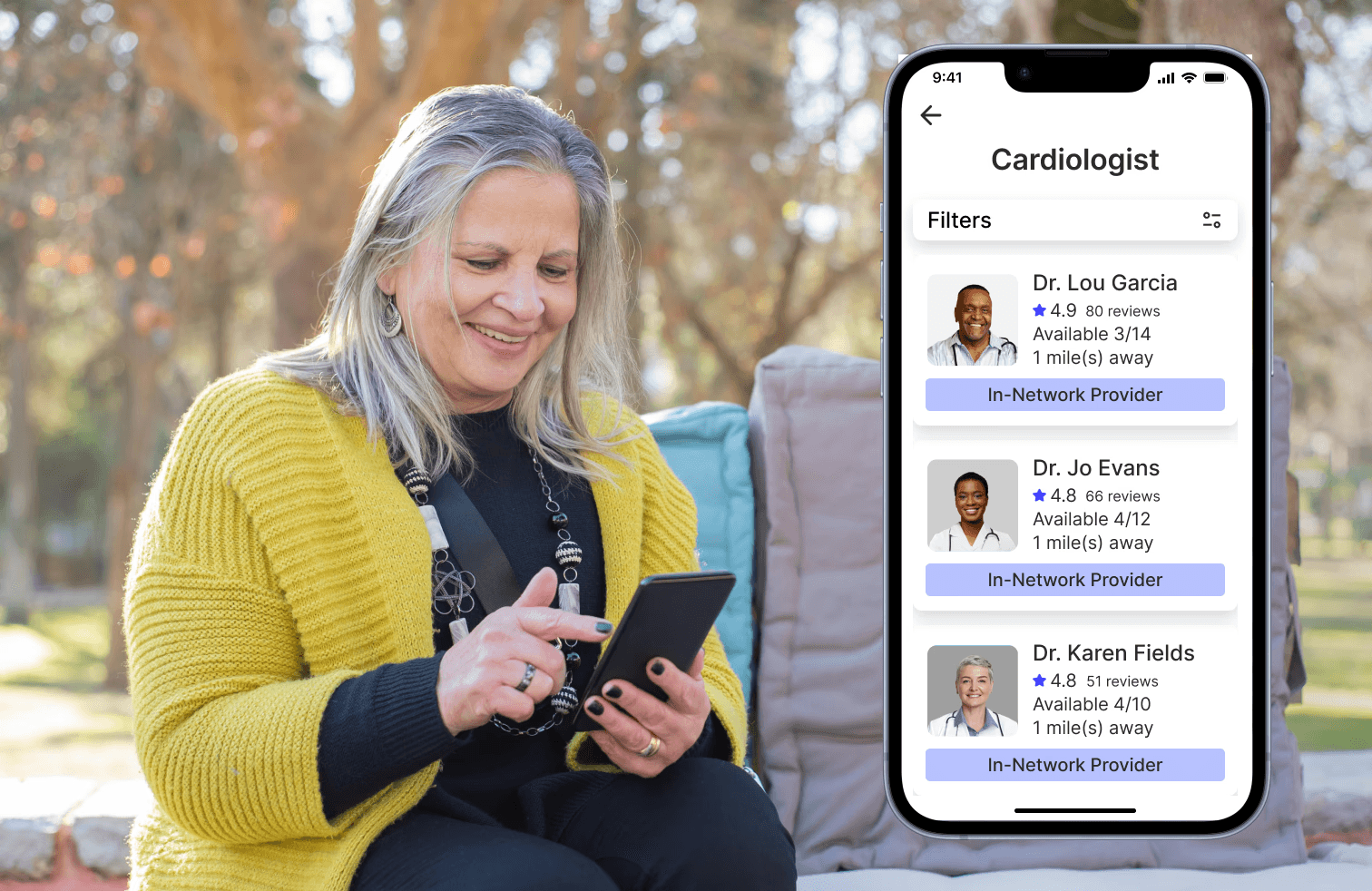
Evermore is a mobile medical appointment app tailored for the elderly audience. It's straightforward, intuitive, and easily readable. These intentional design choices address the primary obstacles hindering older users' engagement with digital health solutions.
Context
During a visit to my grandmother, I observed firsthand the challenges that elderly users face when engaging with digital health solutions. Despite the benefits of using an app to make her doctor’s appointment (such as speed and discounts), she refused to use it, citing several issues.
The text was too small, the buttons too hard to press, the instructions unclear, and she was anxious about making mistakes. This experience highlighted a widespread problem: many elderly patients, like my grandmother, struggle with existing healthcare apps. This sparked my deeper investigation into how these barriers could be overcome to improve healthcare access for seniors.
Key Opportunity Indicators
Significant Challenges for Older Adults in Using Digital Solutions
Many seniors struggle with small fonts, confusing interfaces, and complex interactions in healthcare apps, as noted in the Malaysian Senior Citizen Study and similar research on usability issues.
Rapidly Aging Population in the U.S. and Beyond
One in six Americans is now over 65, highlighting the growing need for healthcare solutions tailored to this essential yet underserved demographic.
Rising Adoption of Technology Among Older Adults
Pew Research shows increased tech adoption among seniors, presenting an opportunity to create accessible tools for independent healthcare access.
My Role
I collaborated with another designer and biomedical engineer to create a medical app experience designed from the ground up to meet the unique needs of older users.
I was involved in
Research
Problem / success definition
Product specs, prioritization & milestones
Sprint planning
Product Design
UI & interaction design
Prototyping
Visual design
Research Insights
Market Research
To better understand the challenges older adults face in accessing digital healthcare, I conducted research focusing on key insights from academic journals and studies.
Research findings (key insights):
Difficulties with Technology: Older adults often struggle with mobile applications due to poor design, unclear interfaces, and lack of support.
Growing Need for Digital Health Solutions: The aging population requires more personalized, efficient ways to access healthcare, reducing reliance on family members and minimizing confusion.
Positive Impact on Stakeholders: By empowering older adults with digital tools, we can improve family members’ ability to manage appointments, reduce administrative burden in healthcare settings, and open new opportunities for medical tech companies.
Interview findings (7 formal interviews)
Through interviews with older adults, we identified several key insights about their preferences and challenges with digital healthcare tools.
Preference for Familiarity Over Convenience
When discussing their experiences with scheduling appointments, many older users expressed a preference for calling the doctor's office. While calling may not save significant time or costs, it felt more familiar to them.
Upon probing deeper, users explained that phone calls were easier not because of efficiency but because they knew exactly what to expect from the interaction.
Common barriers to adopting digital solutions included fears such as “I can’t use technology” or “I don’t know how to do it.” These statements reflected anxiety and a lack of confidence in their ability to navigate new digital systems.
User Experience Challenges
Text and Interface Issues: Many users found it difficult to read small text or interact with tiny buttons on digital apps, leading to frustration.
Onboarding Challenges: The onboarding process of many apps assumed a level of familiarity with technology that these users did not have. This often led to confusion about how to proceed.
Uncertainty Around Features: Users were often unsure about the functionality of certain buttons and features, with one user stating, “I don’t know what this button does, so I don’t want to touch it.”
Discomfort with Touch Inputs: Interactions like pinching, holding, or using pull-down menus were unfamiliar and uncomfortable for many participants.
Problem Statement
Key Objectives
While many older individuals have smartphones, the current design of healthcare apps often present multiple barriers for elder users.
To enhance accessibility for older adults, key features of an ideal healthcare app should include:
Big, Legible Fonts: Clear and readable text ensures users can easily read instructions and information without straining.
Intuitive Iconography: Simple and easily recognizable icons that guide users smoothly through the app, minimizing confusion.
Large Buttons and Touch Targets: Appropriately sized buttons that make it easy for elderly users to interact with the app, reducing errors.
Simple, Familiar Interaction Designs: User-friendly interfaces that assume minimal prior technological knowledge, making it easier for seniors to navigate and use the app confidently.
These features would address common barriers faced by older adults, creating a more accessible and enjoyable user experience.
Defining Success
Success for Evermore aligns with the mission to create accessible digital healthcare solutions for older adults, empowering them to independently schedule and manage medical appointments.
Key success metrics include:
Onboarding Effectiveness: Users can easily complete setting up their own profile without external assistance.
Task Completion: Users successfully book an appointment on their first attempt without help from another person.
Time Spent: Users complete their booking faster than with other appointment apps on the market (e.g., MyChart).
Solution
We aimed to make the app simple, intuitive, and fully accessible from the ground up. Our approach combined research, empathy, and iteration to ensure the app could effectively serve the target audience. We implemented the following design solutions:
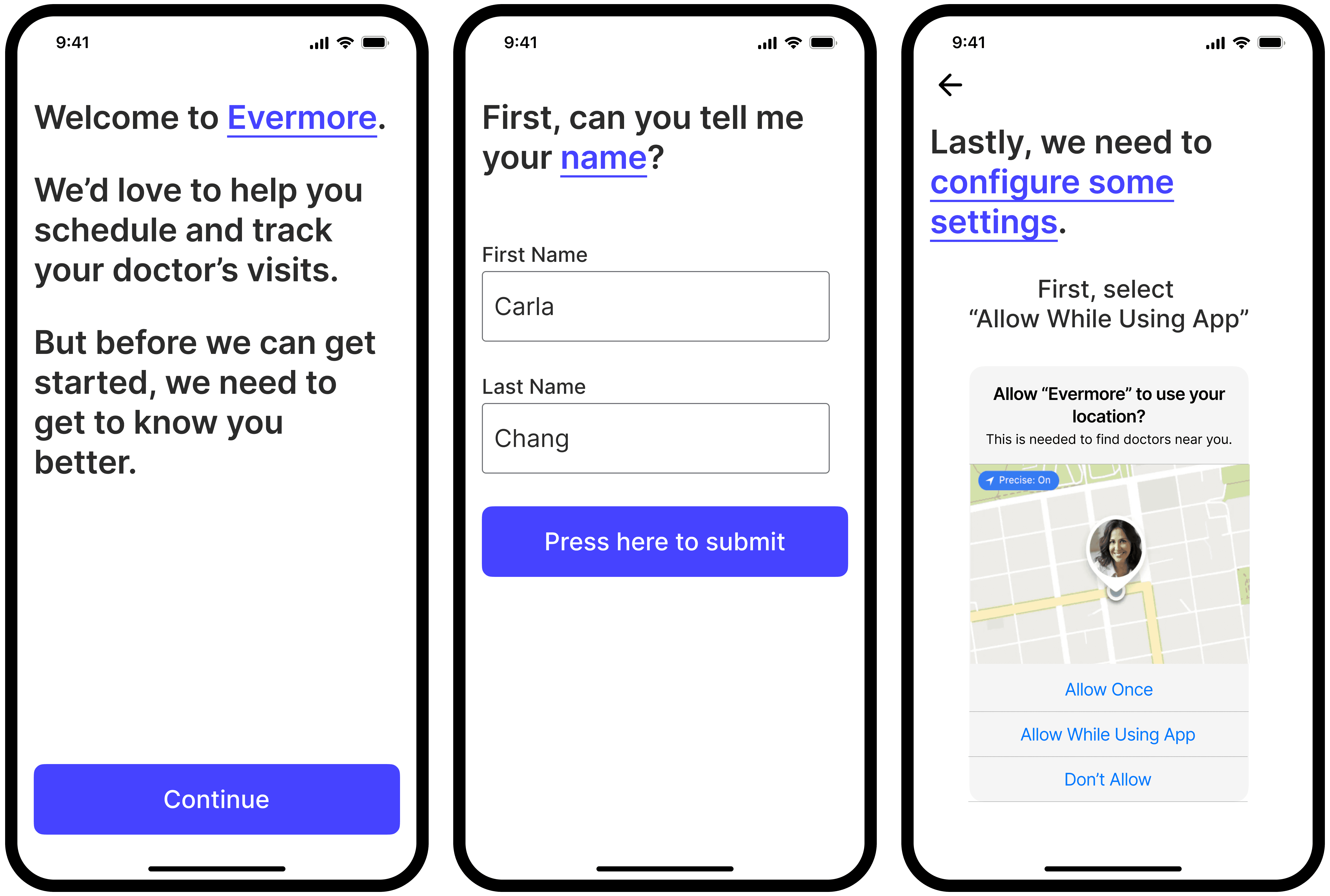
Descriptive Onboarding & Simple User Flows
The onboarding process is simplified and tailored to elderly users, featuring large, easy-to-understand icons and instructions that guide users step by step. This approach eliminates ambiguity and ensures users don’t feel overwhelmed by too many options.
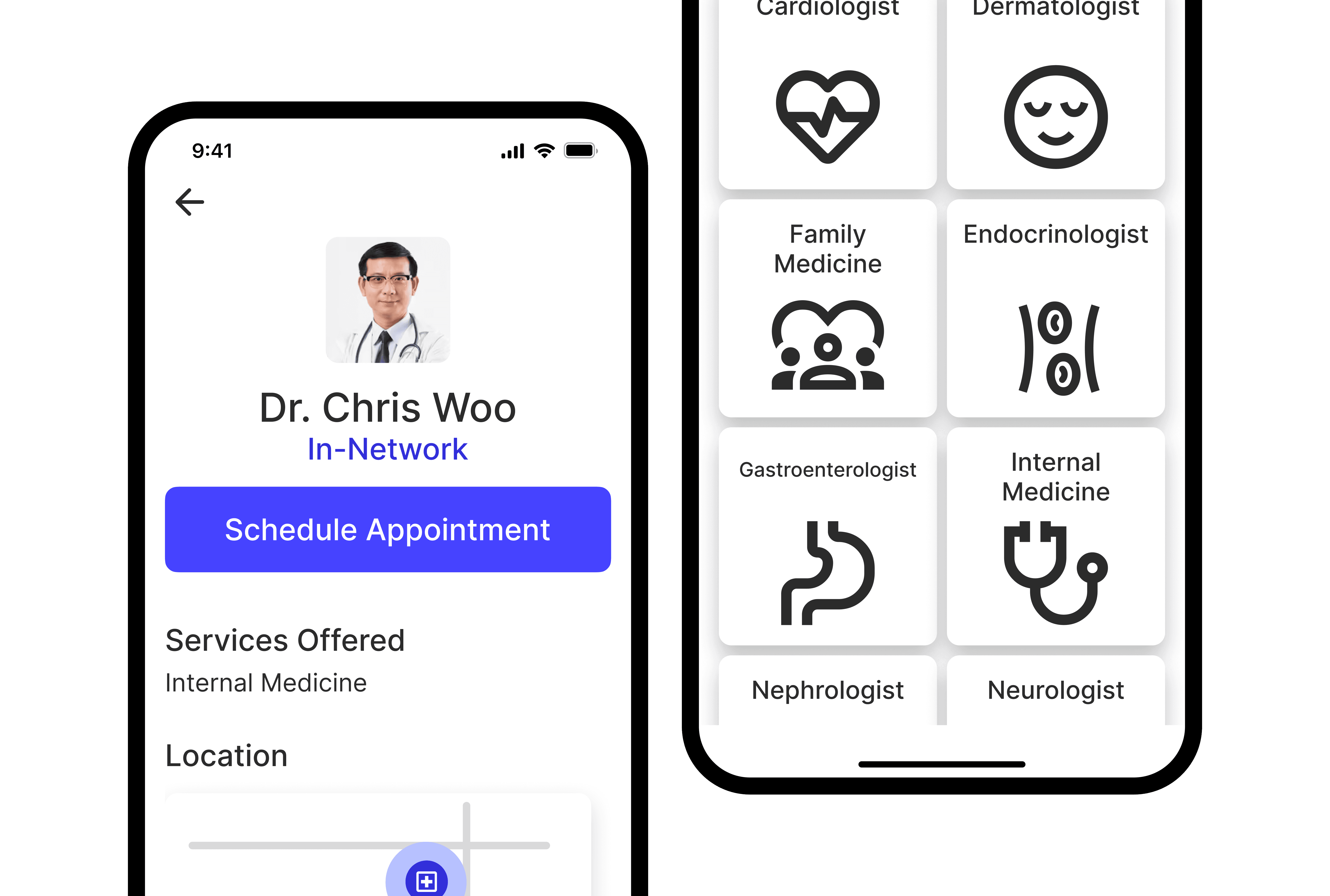
Generous Touch Interaction Areas
Understanding that elderly users often have less dexterity or precision when interacting with screens, we prioritized large touch targets. Buttons and clickable areas were made significantly bigger than those typically seen in other apps to ensure smooth and accurate interaction.
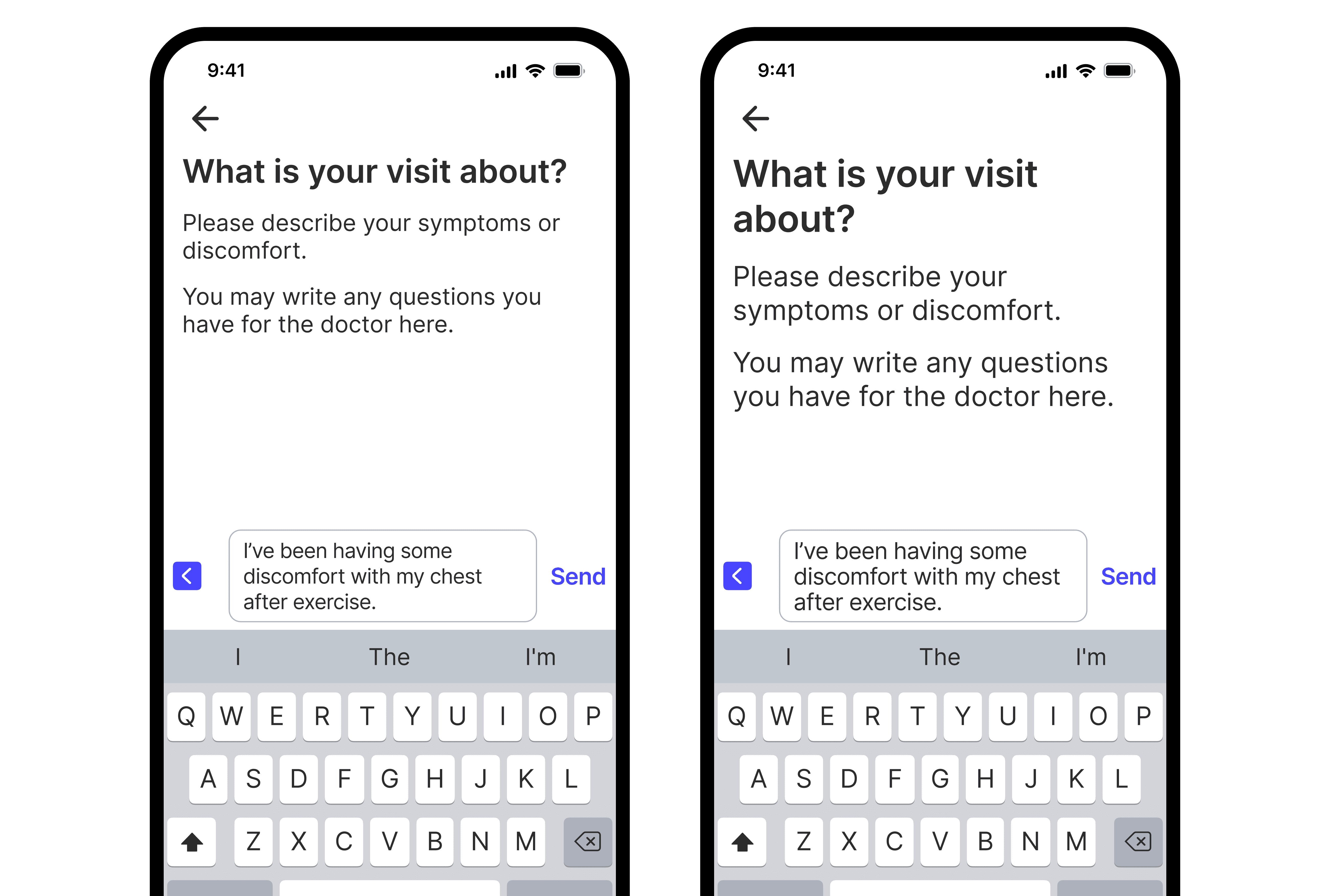
Large, Legible Fonts
We incorporated a large, sans-serif font style with sufficient line spacing to aid readability. The font size was made adjustable, allowing users to increase it if necessary, without compromising the overall layout.
High Contrast Color Palette
A high contrast color scheme ensures that text and buttons stand out clearly against the background, making the app more legible for users with vision impairments or those who struggle with color differentiation.
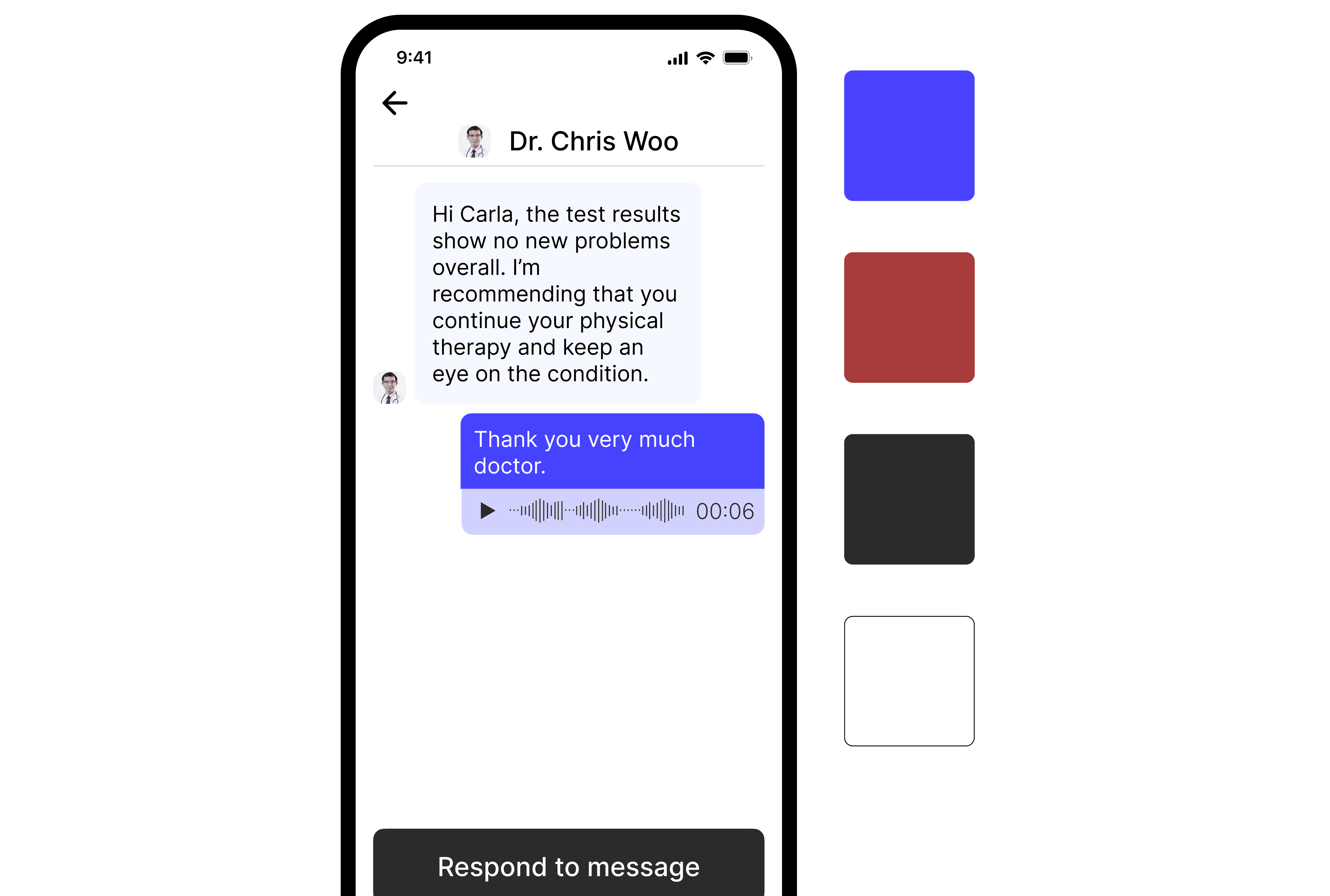
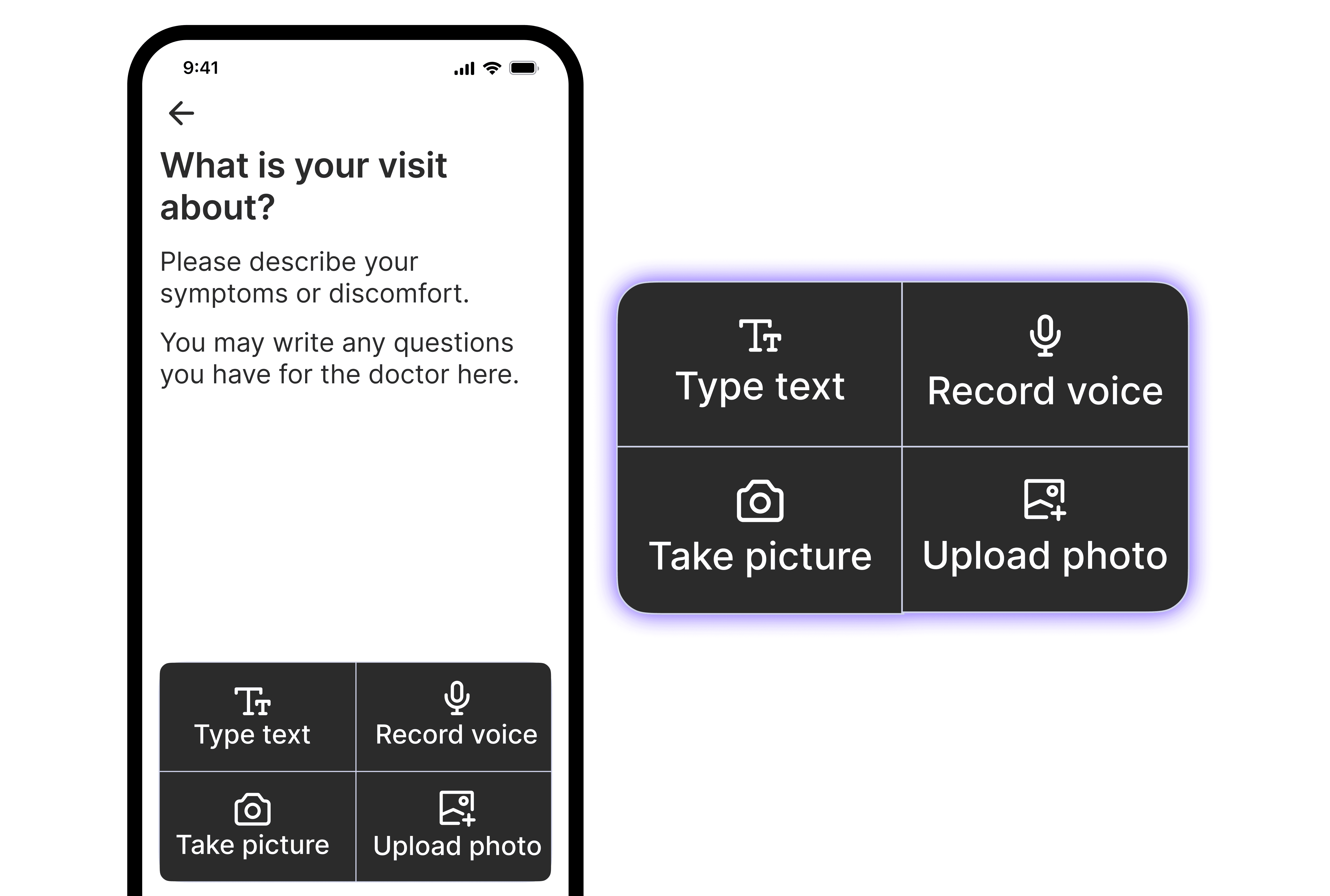
Multiple Methods of Input
The onboarding process is simplified and tailored to elderly users, featuring large, easy-to-understand icons and instructions that guide users step by step. This approach eliminates ambiguity and ensures users don’t feel overwhelmed by too many options.
User Testing & Results
After developing a high-fidelity prototype of Evermore, we conducted several rounds of testing with users aged 56-86. In these tests, every single participant (4/4) successfully completed each core task within the app:
Creating an account
Finding a Primary Care Physician (PCP)
Scheduling an appointment
Sending a message to their doctor
In contrast, when testing existing medical apps like MyChart, none of the users were able to complete the core tasks due to the issues mentioned earlier, such as small fonts, confusing navigation, and tiny buttons.
The success of Evermore was evident in the feedback we received: all users were able to create an account, find a primary doctor, and book their first appointment in less than 15 minutes, a task that had previously been far more challenging for them with other apps.
Thought Process & Key Design Decisions
Empathy Through Personal Experience
My experience with my grandmother was the foundation for understanding the real-world challenges that elderly users face. By involving her in the initial stages of research, I was able to see how existing digital solutions failed her and other seniors. This empathy-driven approach led us to prioritize simplicity above all else in Evermore’s design.
Iterative Design Based on Feedback
We constantly iterated on our designs, integrating user feedback at every step. For instance, in early stages, we realized that some users were still having difficulty understanding navigation cues. To address this, we increased the visibility of interactive elements with bold text and icons and incorporated more visual cues like arrows or step-by-step instructions.
Collaboration Across Disciplines
We worked closely with healthcare professionals, including a nurse, a biomedical engineer, and a design lead at a medical software company. Their input ensured that the app not only met the usability standards but also complied with the necessary healthcare regulations and offered features that would be truly useful for older adults.
Focusing on Accessibility and Inclusion
Every design decision was made with accessibility in mind, from the font size to the use of voice input. We wanted to ensure that the app would be usable for older adults, regardless of their tech proficiency or physical limitations. The overarching goal was to create a solution that could help bridge the digital divide for older adults and empower them to take control of their healthcare.
Lessons Learned
The Importance of Understanding the User's Context
By deeply understanding the specific challenges that elderly users face, we were able to create a tailored solution that truly met their needs. This reinforced the idea that successful design solutions are rooted in empathy and user research.
Accessibility is Not an Afterthought
Accessibility should be an integral part of the design process from the start. It should not be something added as an afterthought, but rather a key consideration in every decision made.
Iterate, Test, and Validate
Constant testing and iteration are crucial to creating a successful design. Listening to users, adapting based on their feedback, and testing often led to improvements in usability that made the final product successful.
The Evermore app is not just a tool for scheduling appointments—it's a bridge that helps elderly users navigate the healthcare system more independently, with confidence.