Overview
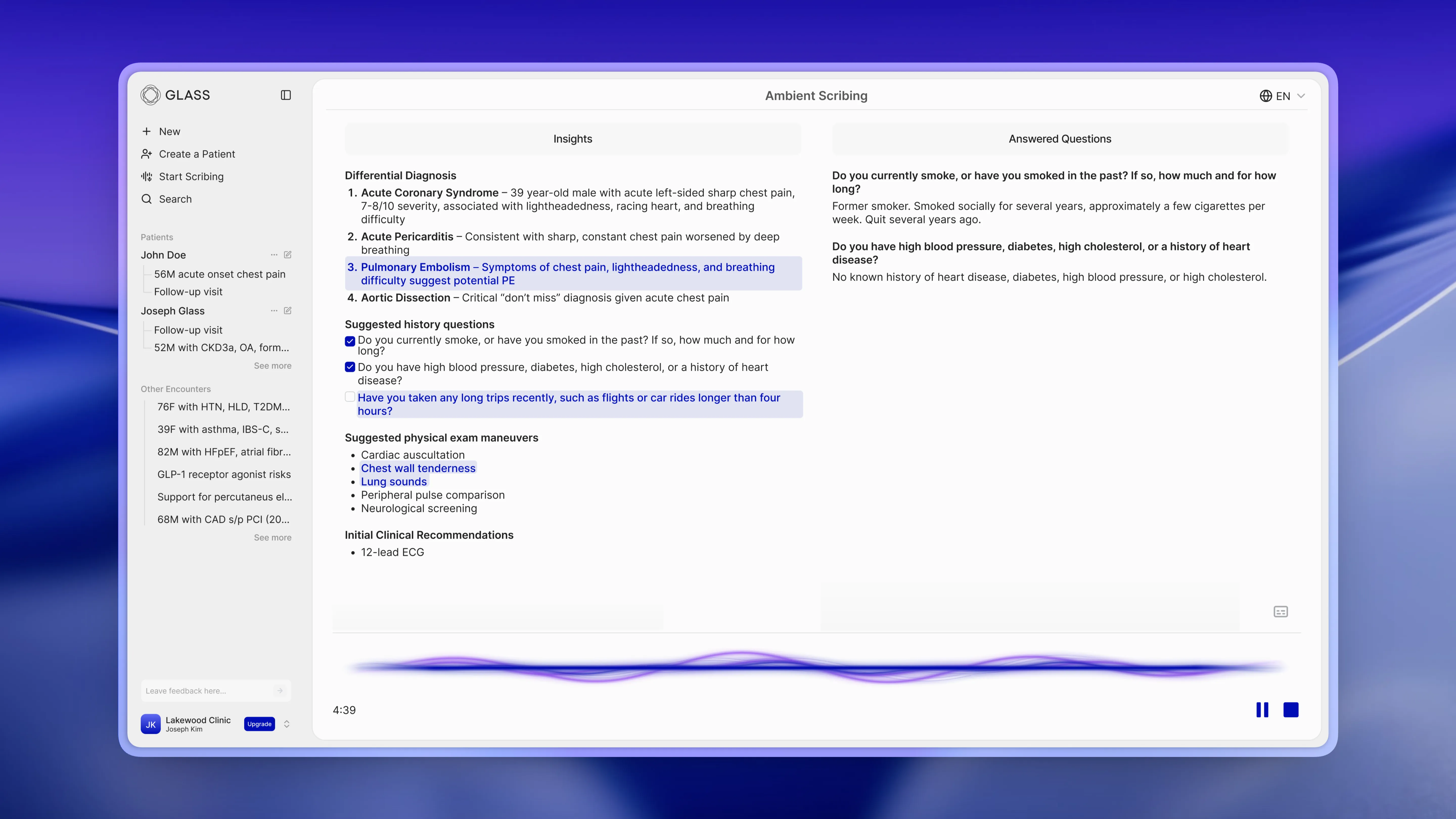
For Glass Health's smart ambient scribing experience, I designed an interface that displays not only the transcript, but also information gathered during the patient encounter and real-time clinical insights.
The scribing modal automatically captures the conversation and updates itself in place, showing new insights as they emerge. Differential diagnoses, suggested questions to ask, and suggested exam maneuvers appear in structured sections on the left side of the interface, with updates briefly highlighted to draw the clinician's eye without being disruptive. Answered questions are kept track of on the right side. Lastly, a dynamic audio visualization at the bottom provides subtle reassurance that the platform is actively listening and processing.
Together, these design cues aim to support clinicians' workflow by being glanceable, timely, and in sync with the conversation.
Problem
Traditional patient encounters force clinicians to juggle multiple tasks at once: listening intently to their patient, thinking clinically, and documenting the important details. This split attention can lead to missed details, incomplete differentials, and rushed or inaccurate notes.
Existing ambient scribing tools focus almost entirely on after-visit note generation, leaving meaningful opportunities to improve the differential and exam or ask targeted history questions on the table because those tools only help once the encounter is over.
Glass Health’s smart ambient scribing feature tackles an unfortunate reality of clinical work: real-time clinical reasoning can suffer when documentation becomes a competing task. Providers don’t have an easy way to simultaneously capture their conversation, extract what matters, and keep their diagnostic thinking organized while the patient is still in the room.
Solution
To extend the usefulness of ambient scribing tools, this interface displays real-time clinical insights and answered questions alongside the ability to view the transcript.
I wanted providers to feel like Glass is thinking with them during a patient encounter while also letting them quickly generate documentation afterward using the latest transcript.
Core Flow
Start a Scribing Session
Pressing the start scribing button immediately begins recording your patient encounter.
The recording waveform was built for clarity and maximum visibility for both the clinician and the patient.
Receive real-time clinical insights
Highlighted clinical insights are updated every 10 seconds.
Keep track of your progress
Information gathered during the encounter is documented, and completed questions are checked off for later reference.
Access the transcript at any time
Impact
Smart ambient scribing acts as a real-time guardrail, ensuring that clinicians ask the right questions and don’t miss critical details during their patient encounter.
Delivers immediate value in-session
High same-session note generation rate
Increased usage volume
Recordings >5 min more than doubled
Clinician sentiment improved
NPS hit an all-time high
Increased Monthly Active Users
MAU experienced double-digit growth post-launch